
Last updated: June 22, 2026
The All-in-One Language Learning App: Flashcards, Speaking Practice, and More
Flashcards, spaced repetition, native audio, and speaking practice with real people - across 67 languages, free on iPhone and Android. One app instead of three.
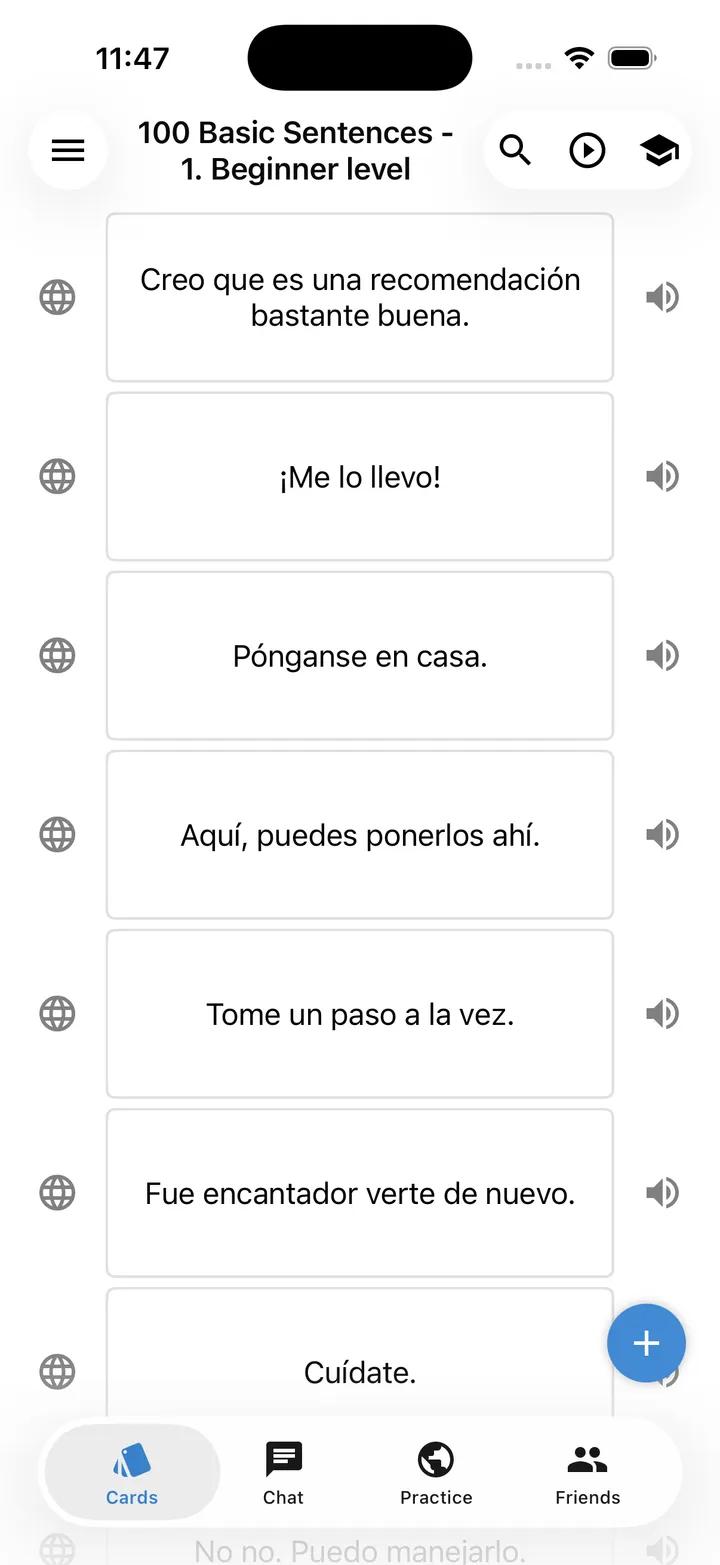
The differentiator
One app instead of three
Most learners end up with a phone full of apps: one to memorize words, one to practice speaking, one for audio, maybe a course on top. Every honest review says the same thing - no single app does it all, so people are told to combine two or three. Lingocard was built to end that juggling, putting vocabulary building and real conversation in one place, for free.
This is not a gamified course that leaves you tapping buttons and still unable to hold a conversation. Lingocard was created by language learners and professional teachers in Silicon Valley for their own use first - so it has the features people actually need to reach fluency, with no ads and no design tricks built to take your money.
Vocabulary that sticks
Build your vocabulary with flashcards and spaced repetition
At the heart of the app is a powerful flashcard system with a built-in spaced repetition engine. The algorithm shows you each word just before you would forget it, so vocabulary moves into long-term memory with the least possible effort, and difficult words come back more often until they stick.
Attach images for stronger visual memory, store unlimited cards in your cloud account, and study several languages at once, switching between them in a tap. Set goals by day, week, month, or year, and watch your streak grow on built-in charts.
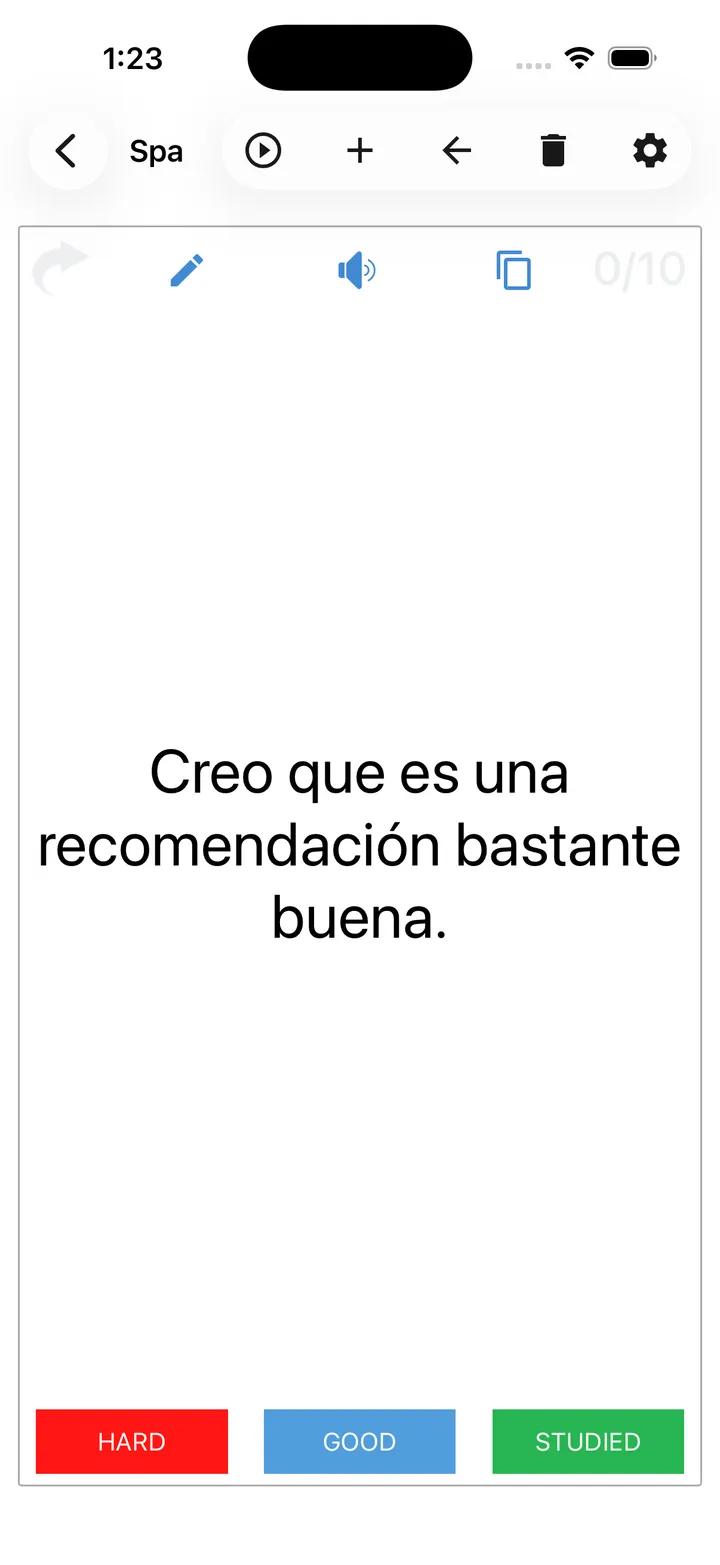
Flashcard review with spaced repetition on the Lingocard language learning app - rate Hard, Good, or Studied.
Train your ear
Hear every word in native pronunciation
Reading a word is only half of learning it, so every card can be heard in clear native pronunciation - in both your native and your target language. Because we use the best speech synthesizers, playback is fast and consistent every time, with excellent pronunciation quality.
Listening as you study trains your ear to recognize words in real speech and gives you an accurate model to imitate out loud, which matters even more in tonal languages. Hearing and seeing each word together builds stronger memory and makes recall far easier in a live conversation.

Instant audio playback
the beach
Add cards fast
Create flashcards your way, even by voice
Adding cards should never be the chore that stops you from studying, so Lingocard gives you several fast ways to build a deck. Tap the plus button and type a card, or simply speak: the app turns your voice into text you can play back later in high-quality pronunciation. You can also browse the knowledge base, where free frequency and thematic dictionaries sit alongside your personal decks in cloud storage.
Need thousands at once? Build on the web
Lingocard's Flashcards Manager creates thousands of cards from any text in a single click. It lives in the web app for language learning, and everything you build there syncs straight to your phone.
Voice-to-card creation - speak a phrase and the language app turns it into a flashcard with native audio.
Real conversation
Practice speaking with real people
The goal of learning a language is to speak it, so Lingocard includes a built-in social network for speaking practice. A free search engine finds your best partners worldwide and matches you by language, level, timezone, and shared interests, so conversations feel natural instead of forced. Practice with native speakers in a classic exchange, or with fellow learners studying the same language as you.
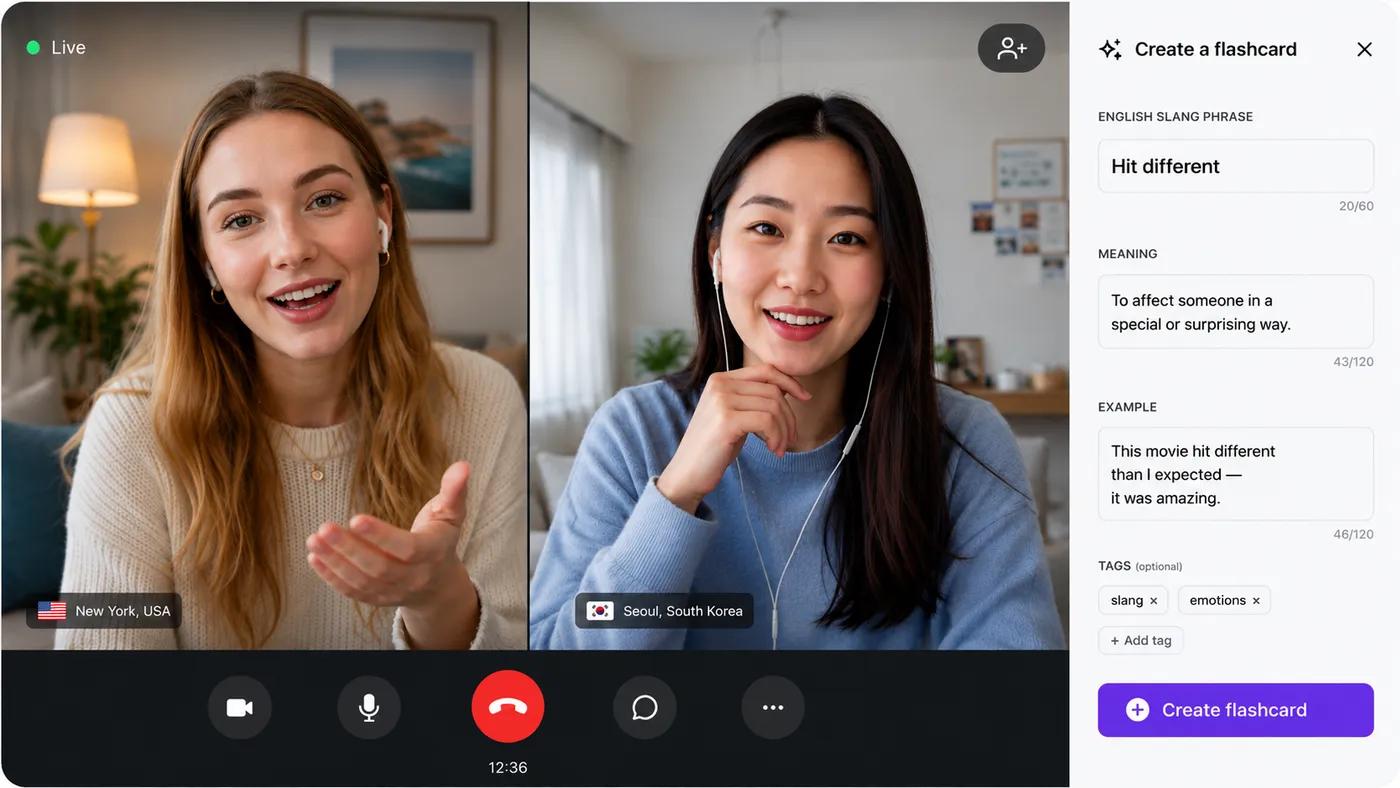
Everything happens inside the app through secure text and video chat, so you never need to share a phone number or move to another platform. When a new word comes up mid-conversation, you can save it straight to a flashcard.
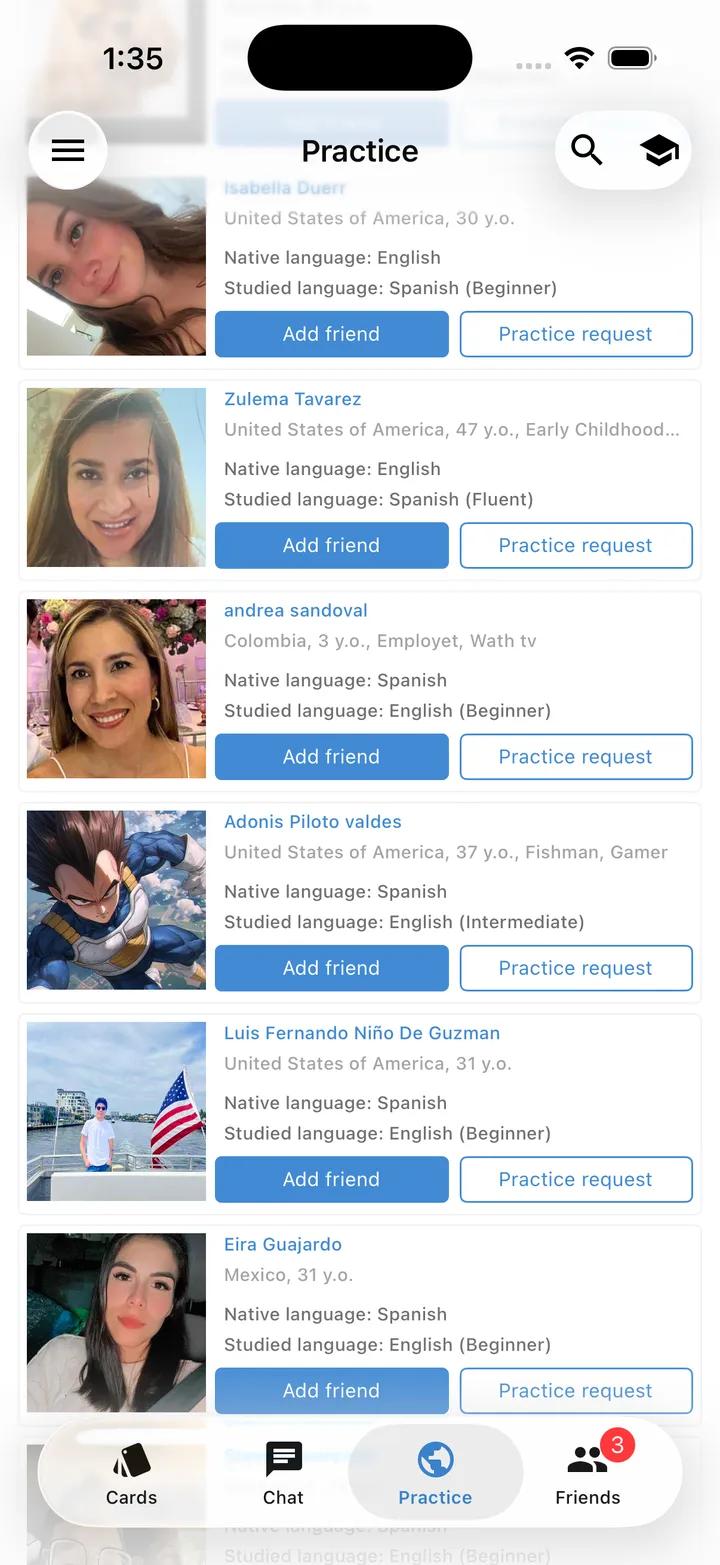
Speaking-practice match screen - find language exchange partners by level and shared interests, then text or video chat.
The hidden gem
Learn while you are busy, hands-free
The most underrated feature in the app is the flashcard audio player. Launch any deck like music and listen while you are driving, running, cooking, or standing in line - it turns dead time into study time and gives you extra repetitions without sitting down to a session.
- 1hola0:30
- 2aprender0:35
- 3mañana0:32
It pronounces your cards one after another, in the order the algorithm chooses for best memorization, so you can absorb vocabulary in moments that would otherwise be lost. This is what makes learning a language fit into a real, full schedule, rather than asking you to find time you do not have.
The app also works fully offline, so you can study on a plane or anywhere without a connection - your sessions are saved and synced the next time you are online. Short, frequent sessions in these hidden moments add up faster than you would expect.
For educators
For teachers: send lessons straight to your students
Lingocard is built for teachers as well as learners. Using the online school tools on the web, a teacher turns a lesson into a deck of flashcards and sends it to students, who then memorize it with the same spaced repetition system on their own phones - so vocabulary is reviewed on the schedule that actually produces retention, and progress is tracked automatically.
Teacher builds on the web
Turn a lesson into a deck of flashcards with audio and images.
Students study on mobile
Each student memorizes it with spaced repetition on their phone.
The classroom side is managed on the web, while studying happens on mobile, so the workflow fits how teachers and students really work. Learn more about how to create your online school, available on the web app.
Every device
Free, on iPhone, Android, and the web
Lingocard runs on iOS and Android, including tablets, and stays in sync with the web app, so a session you start on your laptop continues in your pocket and back again. The core is free - flashcards, spaced repetition, native audio, the audio player, basic dictionaries, and speaking practice all cost nothing.
The honest comparison
Lingocard vs Duolingo vs Babbel
If you are comparing language learning apps, here is an honest look at how Lingocard differs from two of the best-known names. Duolingo is a free gamified course, and Babbel is a paid structured course; neither combines a flashcard system you control with live speaking practice and teacher tools in one free app.
| Feature | Lingocard | Duolingo | Babbel |
|---|---|---|---|
| Price of core features | Free | Free with ads | Subscription |
| Flashcards you build and control | Yes | No | Limited |
| Spaced repetition you can tune | Yes | Basic | Basic |
| Native audio on every card | Yes | Partial | Yes |
| Create cards by voice | Yes | No | No |
| One-click bulk card creation (web) | Yes | No | No |
| Speaking practice with real people | Yes, built in | No | Paid (Babbel Live) |
| Match partners by shared interests | Yes | No | No |
| Teacher lessons sent to students (flashcard decks) | Yes | Limited (Duolingo for Schools) | No |
| Hands-free audio player | Yes | No | No |
| Offline study | Yes | Partial | Partial |
| Languages | 67 | 40+ | 14 |
Swipe to compare
Lingocard was made by learners and teachers for their own use, so it pairs serious memory tools with real human conversation, and connects to a full platform: a flashcards manager, frequency dictionaries, a global social network, and educator tools. You get everything you need to learn a language, in one free app, on every device.
67 languages
Learn any of 67 languages
Whether you want a mobile app to learn English, Spanish, Japanese, or something far less common, the flashcards, audio, spaced repetition, and speaking practice all work the same way. Polyglots can keep several languages active at once and switch between them in a tap. Choose your language to see how Lingocard helps you learn it.
Loved by learners
One app they actually stuck with
I deleted three other apps after a month with Lingocard. Vocabulary in the morning on the train, a quick chat with a partner at night, all in one place. I stopped paying for two subscriptions too.
The audio player is the reason I finally stuck with it. I play my due deck while I cook and half the session is done before I sit down. It fits a real schedule instead of asking for time I do not have.
I assign each lesson's words as a deck and my students actually remember them by the next class. Building on the web and having them study on their phones is exactly how my classroom works.
Creating a card by voice sounds like a gimmick until you use it. I say a word I just heard, it becomes a card with real pronunciation, and it is waiting for me at review time.
Matching by shared interests changed everything. My practice partner and I both love climbing, so the conversation flows and we have become real friends across two continents.
Fully offline on the subway with no signal, then synced the moment I am back online. My streak has never broken because of a dead zone, and that alone keeps me going.
The spaced repetition is almost unfair. Words I was sure would never stick keep resurfacing right when I am about to lose them, and now they just stay. I have never had recall like this from an app.
I am fussy about how I study, and this is the first app that actually bends to me. I choose which side shows first, how often hard cards come back, the audio direction. It fits my routine instead of forcing me into someone else's.
I dropped a whole article into the manager on my laptop and it built a few hundred cards in one click. That same evening I was reviewing them on my phone on the bus. That one workflow quietly replaced two apps for me.
The slang dictionary is the part I did not know I needed. Textbooks never taught me what people actually say, and now I finally catch the jokes at work. I pulled the expressions into cards with audio and they stuck fast.
Phrasal verbs were my nightmare: take off, take in, take over, all of them blurred together. The full collection here, drilled with spaced repetition, finally moved them from a list I memorized to words I just use.
I set a daily goal, a monthly one, and a target for the year, and watching the charts fill in genuinely keeps me showing up. I hit my twelve-month goal a few weeks early and was honestly a little proud of myself.
Frequently asked questions
What is the best free app to learn a language?
Can I use this mobile app to learn English?
Is the app really free?
How is Lingocard different from Duolingo?
Can I practice speaking with real people in the app?
Can I create my own flashcards?
Does the app work offline?
Can I learn more than one language at the same time?
Can teachers send lessons to students?
How do the mobile app and web app work together?
Is Lingocard a good free alternative to Duolingo or Babbel?
Which devices does the app support?
Download Lingocard and start learning today
Stop juggling apps. Get one free app that builds your vocabulary, trains your ear, and connects you with real people to talk to, across 67 languages. Download Lingocard, set your goal, and have your first session in minutes.
Further reading
Learn more on the blog
Go deeper on building vocabulary in the cloud and finding native speakers to practice with.
Cloud-Based Vocabulary Building